Imagine that you just printed 500 pages of a 50-page training manual and are now manually picking up the sets at the copier. This is the reason collate printing was invented and why businesses save hours of post-press work every week because of it. This simple setting will come in very handy, as about 68% of print shops say collation errors are among the top three reasons for reprint requests. Knowing this process means that you approach each print job differently, whether it’s a single report or a packaging run of 10,000.
Collate: When a printer prints multiple copies of a multi-page document in an ordered set of documents, it is collating them. Therefore, the meaning of the word collate when printing is: It does not mean that the machine does everything for you but that it produces complete finished sets that you don’t have to sort out manually.
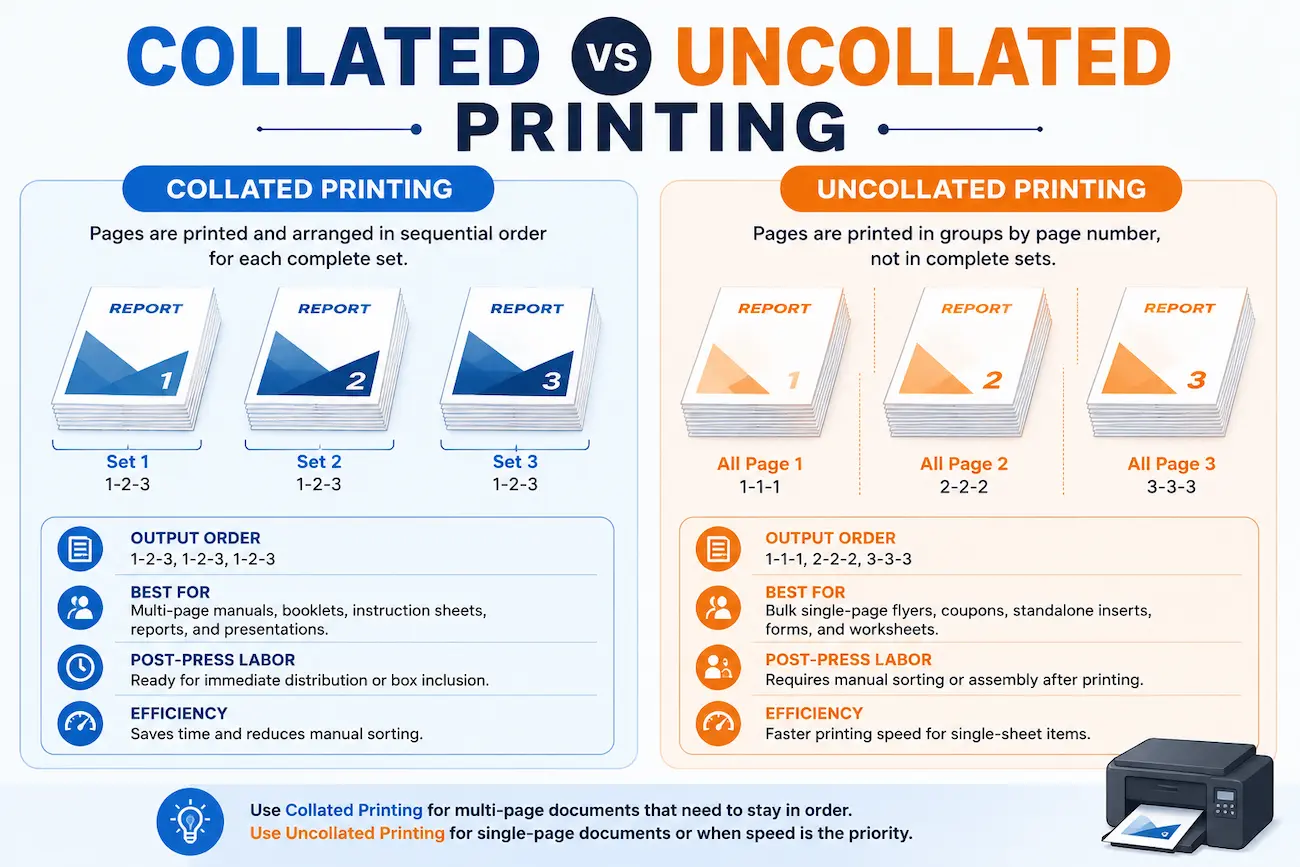
What does collate mean when printing, you may ask yourself? Think about how it is different from organizing your documents in a filing cabinet versus organizing documents in an untidy drawer. Let’s take a look at it with an example:
The first option is more than likely the one that businesses want when printing multiple pages because it means there’s no need to sort anything; collate printing is an actual time-saver.
If we move beyond the dictionary, what is collate printing? It’s the act of putting printed pages in the right sequence across several copies and there are two very different ways in which this process takes place depending on the printers you go to. This behavior can be achieved with a simple driver setting on a home or office desktop printer. Commercial offset and digital presses work differently when it comes to printing: high-speed collating machines with rotating trays pull one sheet from each stack and hundreds of complete sets are formed per minute.
Also, there is a difference in labor. Automated machine collation is based on mechanical trays and sensors for sorting at industrial speed and hand sorting remains in smaller shops or on short custom runs where machine collation isn’t cost-effective. The industry says that an automated collating machine sorts up to 15 times quicker than manual operation. Hence, most commercial printers choose an automated collating machine once an order exceeds a few hundred copies.
The decision of collate vs non collate printing depends on the type of output you’re going to create and how you are going to use it. For jobs that require the document to be read in sequence, collation is the winner but if the job is a single sheet, the winner is the skipper for raw speed.
| Feature | Collated Printing | Uncollated (Non-Collated) Printing |
|---|---|---|
| Output Order | Sorted sequentially into complete sets (1, 2, 3) | Grouped by individual page numbers (1, 1, 1) |
| Best For | Multi-page manuals, booklets, instruction sheets | Bulk single-page flyers, coupons, standalone inserts |
| Post-Press Labor | Ready for immediate distribution or box inclusion | Requires manual sorting/assembly after printing |
| Efficiency | Saves massive time for multi-page projects | Faster printing speed for single-sheet items |
With this insight into the collate vs uncollate paradox, you can avoid two common pitfalls when deciding to collate: paying for collation that you don’t necessarily need or omitting collation and giving your team hours of additional work to sort. After considering collate vs non collate output for your specific project, you will usually know which is the best option.
Smart businesses use collated printing when a document is longer than one page and needs to be delivered to the end user in order. Here are the times it is worthwhile to keep:
With physical products, brands are familiar with the little things that make up the whole unboxing experience. Vexa Packaging turns ready-to-pack instruction booklets, warranty sheets and product guides from press to carton all without manual sorting in between. This type of automated collate printing saves nearly 90% of the fulfillment errors that usually occur when packing boxes and assembling product and the facts speak for themselves: research indicates that mis-packed inserts cause almost 12% of customer complaints related to product packaging. During the arrival of each set, warehouse teams pack faster and ship with fewer expensive errors when they all arrive in the right order automatically.
Collation is no trivial task: it saves time, saves labour and ensures that all multi-page documents are in perfect order from the printer to the end user. Whether you are printing one manual or coordinating thousands of packaging inserts, you will know how to get the job done correctly and efficiently with knowledge of collate printing. If brands require this to happen without any guesswork, Vexa Packaging can include automated collation as part of its commercial print and packaging workflows, delivering every set that your customers open in the same ideal order.
Sometimes, yes. Commercial print shops can charge a bit more for collation because it is an additional machine time and labor. The vast majority of office and home printers, however, do a good job of collating for free, it’s just a feature you switch on or off.
Uncollated prints out the first page of the print job and then the second page of the print job, etc. You get stacks that are sorted by page number instead of full sets of documents.
Go to the Print dialog box and check for a “Collate” checkbox that is close to the copies box. It is checked before printing and your sets are automatically complete and ordered.
You can have collation run without taking color settings into account. Black and white manuals can only be used with the collate option which sorts the pages into sets, regardless of whether the booklet was run in full-color or black and white.
It isn’t necessary to perform this action if your document contains no more than one page. In other words, the collation of one-page flyers or coupons doesn’t have any effect at all.
Imagine that you just printed 500 pages of a 50-page training manual and are now manually picking up the sets at the copier. This is the reason collate printing was...
Pick up a bowl and sit down, for we are going on a colorful, chaotic and wonderful journey through the history of cereal mascots. These cartoon characters make the mundane...
Open it the wrong way and you spoil the moment, brands know this! Whether you’re handling a box, a wrapper or a bag, each item your customers interact with contains...